





 Back to list

For a CIO in search of performance and efficiency, capacity planning is the key to agile steering. For those who have tried, it’s not an easy task. What’s the right approach?
What is capacity planning?
Dynamically managing the availability, assignments and capacity to deliver of an information systems department’s Teams over time is essential to steer, forecast and prioritize activity and resources.
In addition to adjusting resources through workload planning and staffing, capacity planning is a process that determines how best to organize resources to optimize their capacity to produce. In an IT department, the focus is on human resources (CIO staff and external contractors).
The aim of capacity planning is toorganize the IT department’sportfolio of projects and activities in such a way that the team as a whole is best “employed”, for as long as possible, so as to get as many projects moving forward as possible, without exceeding the capacity to do so, and without risking putting the team at risk in the process.
In other words, capacity planning enables us to measure the match between needs per profile and the CIO team’s capacity to deliver. This is a key tool for ensuring that you’re not steering blindly, offering a complete panorama of activity and resources, dynamic over time, and enabling in-depth management to detect in real time upcoming bottlenecks or, conversely, exploit optimization levers.
In concrete terms, capacity planning helps to answer some simple but essential questions:
- Is the planned Workload optimized for the amount of Resources available?
- Are the right Resources allocated to the right Projects and Tasks?
- Over the long term, will we have enough resources and the right skills, or will we need to organize ourselves differently to ensure production (recruitment, outsourcing, training, etc.)?
What are the objectives?
Capacity planning provides CIOs with an advanced level of steering and facilitates decision-making by enabling real-time comparison between staffing requirements and the capacity to cover them. It enables different objectives to be met, depending on the timeframe involved, but always with the same objective in mind: to achieve the best possible allocation of CIO resources. Here are a few examples:
- Short-term (3 months):
- analyze the balance and viability of schedules
- arbitrate on the possible start-up dates for a project in terms of future Availability
- À plus long terme :
- forecast future needs in terms of recruitment, outsourcing or Skills reinforcement
- on the contrary, anticipate the release of resources (especially external ones) to adjust budgets and commitments.
What are the benefits of capacity planning for the CIO?
The benefits of capacity planning are legion, which is why so many IT Directors, PMOs (Project Management Officers) and Heads of CIO Offices are keen to implement it:
- Optimize the allocation of the right resources to the right places: capacity planning consolidates requirements across the entire portfolio of projects and activities. Where a project manager can identify the type of generic resources (by profile) he or she needs, and over what period of time, a CIO or PMO with a capacity planning tool can ensure that the right people with the right Skills are available and employed at the right time for the project.
- Facilitating decision-making: capacity planning offers a particularly effective overview, enabling us to share, in complete transparency, the reality of resources mobilized, and to anticipate potential bottlenecks or, on the contrary, insufficiently staffed resources. Numbers don’t lie, and this provides a tangible basis for negotiation and often facilitates decision-making, for example when it comes to making up for a proven shortage of resources (at a given moment, or for a given skill).
- Increasing the efficiency and commitment of each player: Capacity planning is a tool that enables each player to plan ahead. Knowing what each person is working on in the short to medium term is a guarantee of performance, as it enables them to prepare themselves, to know what’s coming (which is reassuring) and, if necessary, to adapt more quickly if the need arises. On a company-wide scale, it gives the organization a more complete view of the Resources available for Projects, and in particular for integrating new ones if conditions allow.
- Improve CIO strategic planning and Skills management: Capacity planning is the key to anticipating medium and long-term resource requirements, even over several years. Will we have enough Skills available, and do we need to keep them on hand? If not, do we need to plan for new recruitment or outsourcing? Should we invest in training or, on the contrary, outplacement if certain resources are no longer needed? Analyzing capacity planning at the level of the Projects portfolio as a whole provides a clear picture of the needs expressed by profile. Coupled with a good mapping of Skills, this will make it possible to identify any gaps (type of skill missing or not sufficiently provided for to successfully complete certain Projects) and to draw up plans to remedy them: training strategies, recruitment, outsourcing.
- Optimize your CIO’s budget performance by working on the basis of measured, well-reasoned assumptions: wise capacity planning management offers prospects that go far beyond the strict control of your CIO’s human resources. First and foremost, it provides in-depth knowledge and understanding of the Budgets. By integrating human costs, it is possible to build and share a complete and exhaustive approach to the real Budgets of Projects (and therefore, by extrapolation, of the portfolio, and more broadly of the IT department’s budget). In this way, capacity planning tracking eliminates many grey areas and enables high-impact communication with all CIO stakeholders (Business Units, CFO, CEO, etc.). As Jacky Galicher, former DSIT at the Académie de Normandie, testifies: “Transparency is important for building trust. To share the challenges of a project portfolio, you need to be able to explain to management the human resources mobilized for a given project, and assess its budgetary impact.”
Reconciling a real-time view of capacity planning with detailed budget tracking (by fiscal year, project, etc.) enables you to steer the CIO’s budget forecast accurately and with agility, and to anticipate any risk of drift. - Building the future on sound foundations: in addition to real-time knowledge of performance in relation to objectives, abacuses enable us to draw lessons from the past in order to re-evaluate as accurately as possible the amount of time to be spent on future Projects or activities. They will therefore facilitate long-term projection and planning for efficient resource allocation, by identifying trends and adjusting accordingly. In this way, the CIO and PMO benefit from “one step ahead”, paving the way for more effective steering and better optimization of Resources.
How do you implement capacity planning in your CIO?
Attractive on paper, capacity planning is not so simple to implement and maintain over time. In many CIOs, the idea that capacity planning is obsolete before it has even been launched, because tracking it would be a real headache for Teams, is a real obstacle to the implementation of such an approach.
Without denying the complexity of the process, a number of factors must be taken into account in order to succeed:
First, be clear about your objectives. Tracking workloads, assignments, availability and capacity planning: these notions are intertwined but distinct. However, it is important to determine the expected depth of Teams management, the underlying intentions, and the conditions to be put in place to achieve them. Do we need to simply track time spent in order to analyze what is consumed? A Workload plan to give Teams visibility? Or advanced capacity planning to detect upcoming bottlenecks in real time, or exploit optimization levers? Depending on the answer, the prerequisites are not the same.
Secondly, to take into account the operational expectations of all stakeholders
Capacity planning is the way to get everyone in the Information Systems Department to agree. If we manage to satisfy everyone’s operational expectations without neglecting the need for strategic steering, it’s a big step towards a CIO that collaborates effectively for its performance. Everyone will find an answer to their needs:
- Projects manager: plan resources, monitor consumption
- PMO: identify and optimize bottlenecks (over- or under-staffing)
- IT Managers: provide factual accounts and facilitate decision-making, whether in terms of arbitration, recruitment or outsourcing.
- All CIO staff: obtain visibility on the balance of workloads and the direction of action taken
- DSI: concilier en temps réel la vision de plan de charge ET ses impacts budgétaires pour anticiper et prioriser l’activité et les ressources :
- A consolidated macro view to steer Resources wisely, flexibly and agilely
- Reconciliation of capacity planning vision with detailed budget tracking (by year, project, etc.);
- Ability to give visibility to business lines and management
Also, don’t get ahead of yourself so as not to overdo things. As the saying goes, “he who embraces too much, embraces poorly”. Capacity planning often fails because of excessive ambition. And nothing is more discouraging for Teams than a promising Roadmap on paper that becomes obsolete before it has even been implemented. It is therefore advisable to build up gradually, taking care to involve all stakeholders at every stage.
- If you’re starting from scratch, you need to begin by tracking and analyzing the time spent on CIO projects and activities. This will already provide valuable initial information for updating your forecast and charts.
- We then deepen the analysis with the Capacity plan: each employee benefits from a clear vision of his or her Workload, managers from an overall view of their team, and the CIO and PMO from a global perspective of needs by profile, to anticipate tomorrow’s skills requirements.
- Managing Teams’ Availability means anticipating bottlenecks, identifying and resolving them, and exploiting optimization levers.
- Finally, capacity planning enables you to achieve the best possible allocation of CIO resources, by comparing in real time staffing requirements and the capacity to cover them, on different timescales.
And finally, the right tools. Even more than a simple workload plan, tracking capacity planning requires simple, collaborative, real-time PPM (Project Portfolio Management) software. The sheer number of players involved, the need to test scenarios, and the requirement to work with up-to-date data, make it very risky to use a spreadsheet-type tool that is difficult to maintain over time. We must not hesitate to call on solutions dedicated to CIO management, which facilitate collaboration and ensure that time recording (which remains the basis of the system), as well as Availability and Capacity plan tracking, are adopted by all Teams. And that’s without forgetting the support provided for change, particularly in the Tracking, analysis and valuation of time spent, which has a direct impact on all CIO staff.
The testimony of Damien Bongart, CIO at INSA Rennes, is particularly enlightening in this respect:
You don’t want to get into a gas factory that you’re going to drown in. In the past, I’ve experienced tools that could be completely customized. There’s a tendency to want to look too good, to think too big, and you get completely lost. A project manager or project director needs to be able to enter the tool easily and find his or her marbles; and the person in charge of Budgets needs to be able to use it more expertly.
In this way, the Agility provided by capacity planning is within the reach of all CIOs.
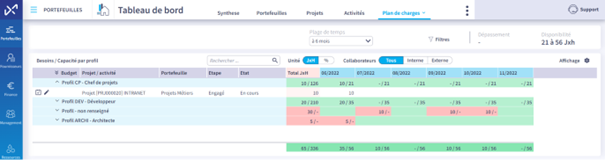
Which Dashboard for capacity planning?
The whole point of capacity planning is to enable each CIO profile to find the information they need, in personalized views. The full potential of capacity planning is realized by cross-referencing several dashboards.
It is therefore interesting to monitor and analyze :
- Workload plan by employee and by Teams
- The overall Workload plan for Projects AND Activities and related allocations
- Overall needs to be filled over time, vs. capacity by profile.
Useful KPIs include the ability to :
- play with time ranges: 3, 6, 12 months, etc.
- filter employees between internal and external
- visually highlight availability and overruns, and filter on one or the other to facilitate rebalancing
- have access to profile summaries in JxH or in % of assignment
- navigate easily between the macro view of the portfolio and the detailed view of a project or activity
Which tools?
When it comes to capacity planning, there‘s no such thing as a miracle tool, and even less such a thing as a good tool without the associated organization and processes. It’s essential to be clear about your needs and objectives (and those of all the players involved) in order to evaluate the different solutions and find the most appropriate one.
One thing’s for sure: while a tool can help structure an organization by providing a framework that facilitates changes in practices, it must be sufficiently flexible to support the defined organization (whether already in place or newly created), and not the other way round.
Before thinking about tools, it is important to define :
- what are the roles and responsibilities of each person involved, the links between them, the expected reporting bodies and methods, etc.? The chosen tool must enable everyone to operate within this organizational framework.
- what are the processes for data collection, control, reporting, resource allocation, etc.? Without defined, clarified, shared, accepted and adopted processes, and even with the most accomplished of tools, the machine is likely to run out of steam.
The right Capacity planning Tracking tool will meet the dual challenge of involving all stakeholders while simplifying everyone’s tasks.
To get everyone in the CIO (and beyond) on board, we recommend opting for a :
- able to adapt to different work situations, to meet specific needs throughout the Projects value chain;
- simple, intuitive, flexible and easy to learn, because Project management will involve users who may be novices or simply “passing through”;
- capable ofautomatically feeding the micro into the macro, because “rekeying” or “duplicate data entry” when the tools don’t talk to each other will generate natural resistance on the part of users;
- able to propose the right methodology and granularity for accurate but consistent management… despite the heterogeneous nature of the projects in the portfolio, whether more or less complex or strategic.
One final point: it’s essential to clearly define the scope you want your capacity planning and, more broadly, PPM solution to cover . Thinking too big, being too ambitious, means running the risk of embarking on a gas factory through a tool that is too complex, not sufficiently collaborative, and of which you will only use a tiny fraction of the functionalities. With the constraints associated with these overly “refined” tools:
- or implementation (time-consuming, costly set-up);
- or in use (over-equipping with functionalities not always adapted to the needs of CIOs that are not large ETIs).
It was with all these parameters in mind that former CIOs and IT Managers conceived and developed the Abraxio solution. They have experienced the pitfalls of capacity planning management from different angles, and have designed a tool that meets the real needs of IT departments. A tool that’s right-sized, pragmatic, flexible and yet provides a framework. A unique tool that integrates all the dimensions of CIO steering (Budgets, Projects, Suppliers as well as Teams), which is a precious guarantee of time-saving, efficiency and reliability, as well as added value for business management.