





Reporting and showcasing project progress

Effortless,
Provide clear, visual project overviews for structured progress reviews
Communicate project value clearly
Enable confident prioritization, share reports effectively, and highlight your strategic contribution
Testimonials
from CIOs

Abraxio nous a changé la vie ! Du fait de sa simplicité d’utilisation, l’outil donne seulement en quelques clics une vision globale du budget de la DSI.

Les discussions avec la DAF et le CODIR ont gagné en clarté et fluidité. […] La plateforme permet de gérer les notions de Capex et d’Opex et d’expliquer leur impact d’une année sur l’autre. […] C’est presque devenu un jeu d’enfant de montrer comment l’investissement se transforme en fonctionnement.

Abraxio me rend vraiment service et a été un outil de communication vis-à-vis de mon DG…

Vu la facilité de mise en oeuvre d’Abraxio, j’ai du mal à comprendre les DSI qui continuent à gérer leur budget dans Excel !
Structure, organize, and share project progress with ease
To capture attention and support informed decision making, project portfolio reporting must be clear, engaging, impactful, and aligned with stakeholder expectations. With Abraxio, highlight what matters most across your projects, as effectivele as possible.
A shared framework tailored to every stakeholder
Ensure a clear, coherent and evolving vision of current initiatives, and facilitate exchanges.
- Use simple, standardized project profiles to consolidate key project information
- Work with preconfigured or customizable templates and reports managed by administrators
- Facilitate alignment between IT, business teams, Finance, and senior management

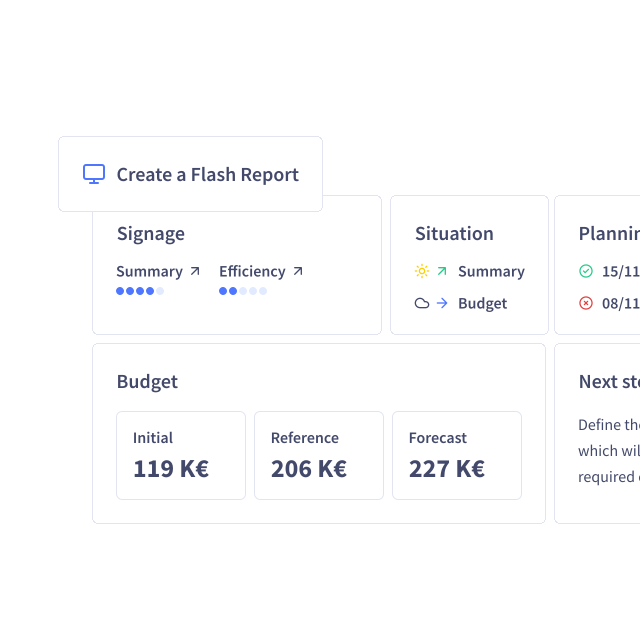
Flash reports for your projects and activities
Generate, export, and share executive summaries in seconds:
- Use predefined templates automatically populated with live project data
- Access full page or full screen reports, ready to export to Excel or PowerPoint with polished formatting
- Export reports individually or in bulk

Dashboards, custom views, alert management
Make communication and collaboration central to effective project management:
- Work with concise dashboards and custom views tailored to different stakeholder needs
- Track progress in real time with platform generated alerts and monitoring indicators
- Use configurable project roadmaps to instantly compare current and baseline schedules
Abraxio — the only all-in-one platform for 360° IT department steering

Built to empower
professionals in their day-to-day management
Case studies
in connection with project portfolio management

Try Abraxio and you’ll be delighted!

Without Abraxio, you waste your time looking for the numbers; with Abraxio, you steer, decide and arbitrate.

Abraxio is a real management and decision-making tool.

Abraxio’s main benefit is 360° CIO management.

The return on investment in terms of functionality and operation is undeniable.

One single source of truth: centralized control data as a strategic lever for the CIO

Abraxio has changed our lives! Because it’s so easy to use, just a few clicks are all it takes to get a…

The CIO is also entitled to its own integrated solution to steer and improve the performance of its activities.
Resources
related to PPM
Frequently Asked Questions About the PPM
Is it possible to create project templates with Abraxio?
Yes, Abraxio lets you create and save your own project (or activity) templates: either by building on existing Projects or by creating them from scratch.
What sets Abraxio apart from other PPM solutions?
Abraxio stands out from other PPM solutions because it is specifically designed for CIOs. Beyond its ease of use and the flexibility it offers, Abraxio promotes collaborative project management by involving business units from the very beginning of the requirements definition phase, while providing real-time tracking through concise, customizable reports.
Finally, Abraxio stands out in particular for its unique ability to easily reconcile the annual budget with project budgets, enabling CIOs to monitor and adjust the financial impact of projects on the overall budget in real time, thereby providing clear and continuous visibility into allocated resources.
Does the Abraxio solution help align capacity planning with the IT department’s budget management?
Abraxio enables real-time reconciliation of resource tracking with budgetary impacts. By natively aligning projects, teams, and budgets, the solution provides a consolidated view that enables you to accurately steer budget forecasts, identify under- or over-staffed resources, adjust financial commitments, and communicate transparently with stakeholders (Senior Management, Business Units, CFO) regarding needs and priorities.
What is the difference between a capacity plan and capacity planning?
Employee workload planning enables precise steering of projects and activities, from cost estimation through to staffing. For managers, the capacity plan provides complete visibility into their employees’ activities and forecasts. This information enables them to take action, anticipate potential issues, and leverage opportunities for optimization.
Capacity planning is a more strategic process; it provides a high level of control by enabling real-time comparisons between staffing needs (the daily and hourly Budgets for Projects and activities) and the capacity to meet those needs (the number of days worked by employees).