




From portfolio planning to project management
Adopt a single tool that brings all players on board
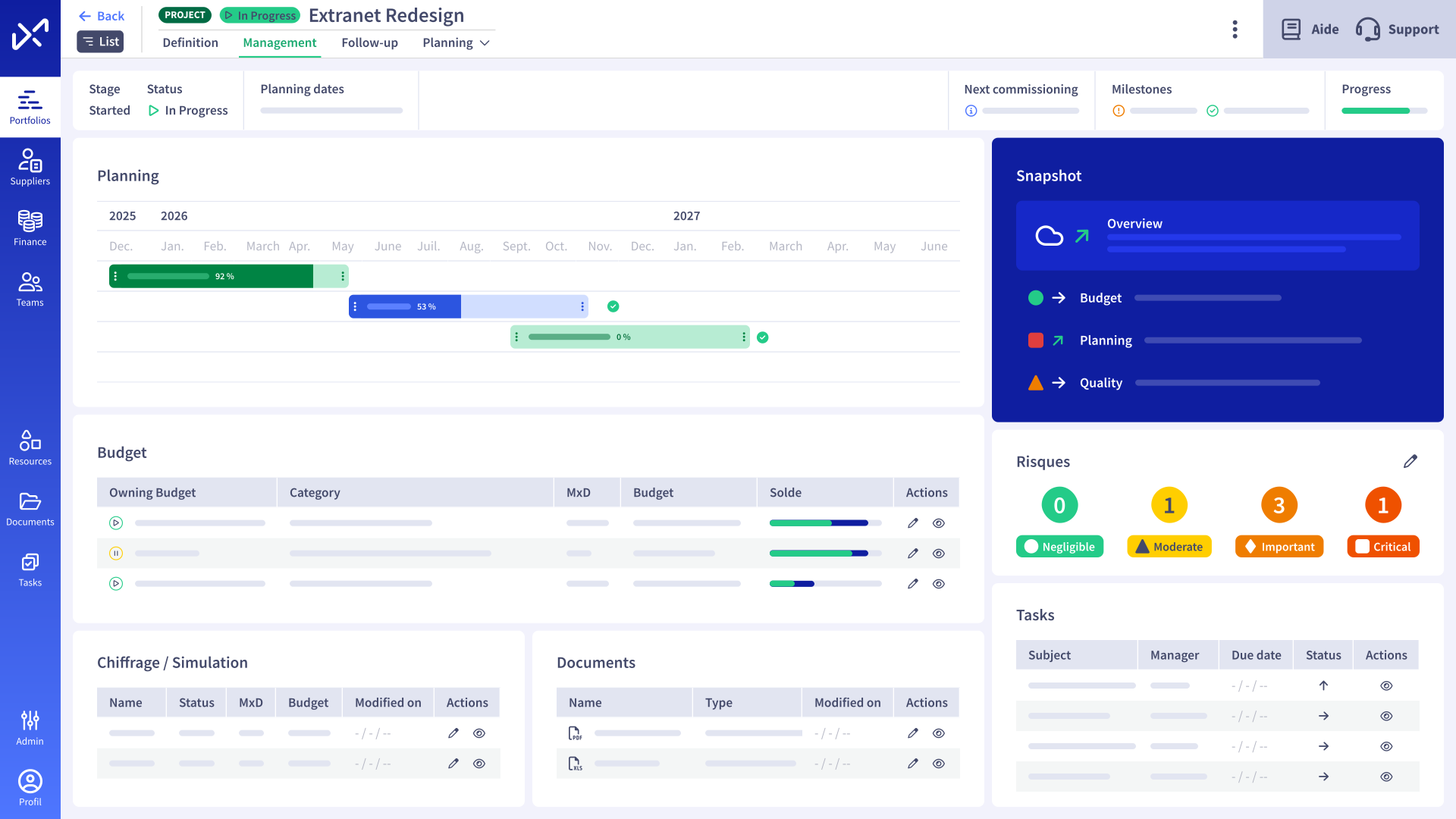







Transform your approach
to your portfolio and your Projects
To manage
Involve all stakeholders wisely and facilitate everyone’s tasks
To steer
Track progress in real time and arbitrate with all the keys in hand
To communicate
Share synthetic views, weather forecasts and flash reports to animate and report on your events.
Projects management
Structure your Projects portfolio to suit your needs
With Abraxio, you can organize your Projects portfolios according to your organization’s needs : by structure (subsidiary x, y, z), by nature (internal projects, customers), by type (strategic, business, technical), etc.
For each project, you adapt the framework to its specific management needs. In this way, you benefit from both a very simple, pragmatic environment for “small projects” and a complete, advanced environment for strategic, complex projects.
Abraxio maintains consistent views and analyses of your Projects portfolios across all your initiatives!

Tracking Projects
Offer your Teams a simple framework
The project approach involves numerous stakeholders with very different roles and varying levels of maturity: project manager, project team, CIO, PMO, business unit leadership, or senior management…
Abraxio brings them on board by offering them a simple, flexible, intuitive, easy-to-use framework, in which they find the elements and the level of information they need to play their role. This is the key to ownership.
Abraxio offers you a complete toolbox covering all project phases from ideation to delivery: challenges, needs, value, solution, cost, Capacity plan, Gantt planning, tasks, documentation, flash report, etc.

Consolidating Projects
Facilitate smooth, Made simple to-and-fro movements
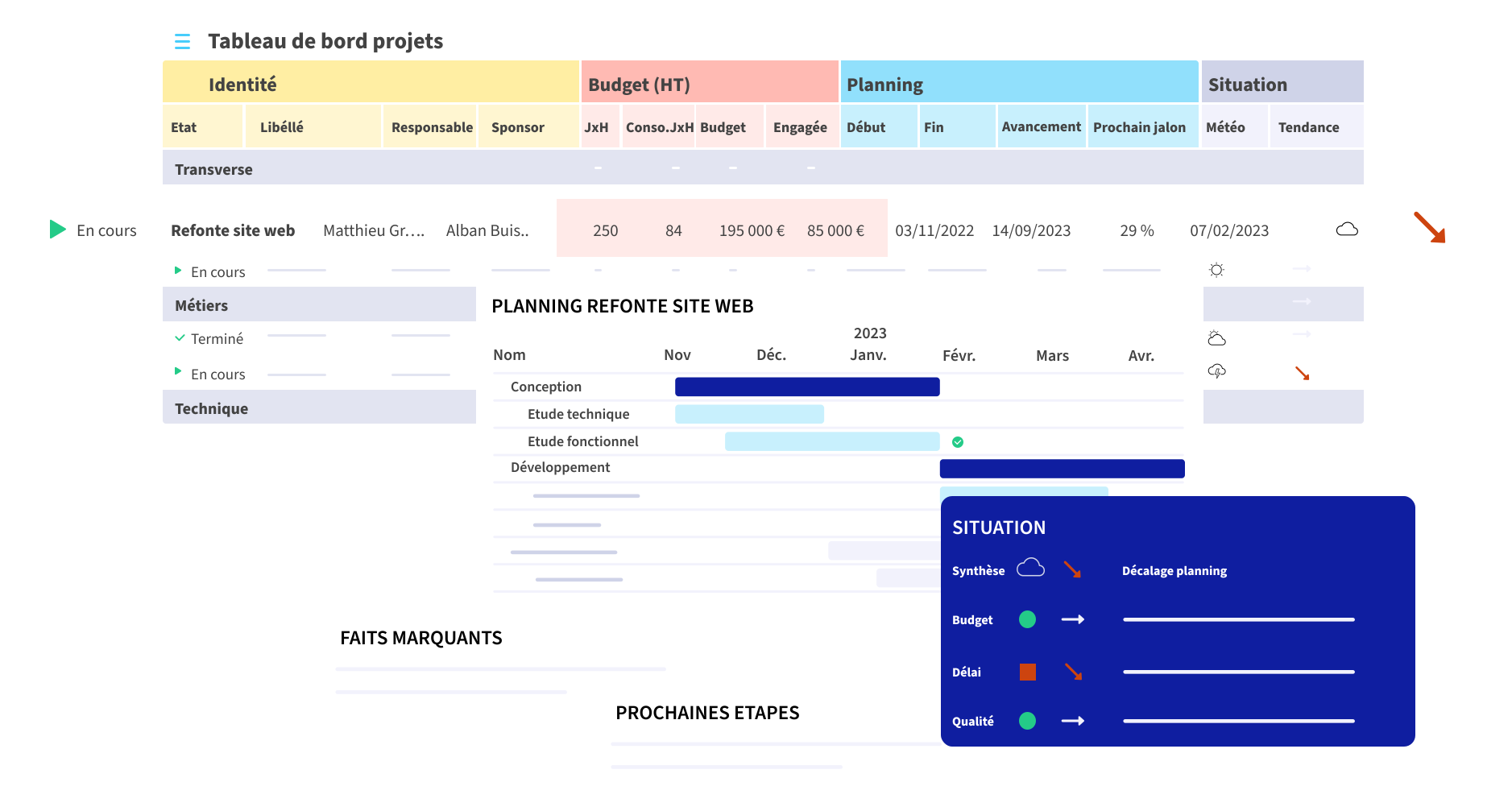
To prioritize, plan and execute projects, and to report, arbitrate and communicate, you need to navigate constantly between the global view of the portfolio – which must be up to date – and the details of each project. Consolidating data in this way is often a real ordeal for those who have to chase down up-to-date information, re-enter it and aggregate it in a medium that is often rapidly obsolete.
Abraxio removes this major obstacle: it’s the micro data, useful on a day-to-day basis for the project manager and captured at the finest level, that automatically feeds the macro view of the portfolio. Whatever the level of management, each project is rendered in the same way, and you can always drill down to the desired level of detail, if necessary, for a more in-depth analysis.
Portfolio management
Customized views for everyone
Project Tracking for PMOs, employee contributions, visibility for business teams, sponsors or management: everyone’s work situation is different. To ensure that each stakeholder is provided with the right level of detail, without being drowned in superfluous information that would be counter-productive and inappropriate, Abraxio offers customized views according to needs, and access to the platform adapted to usage.
For example, you could provide senior management with an arbitration view of new strategic projects, focusing on analysis of the value generated, and a tracking view of major Projects, highlighting weather and risks.

Portfolio arbitrage
Speed up and secure
with scoring
At the start of each project, Abraxio enables you to qualify each item in your portfolio by establishing a score indexed to the value generated with regard to execution conditions. In this way, you’ll facilitate decision-making by highlighting the highest-potential Projects aligned with corporate strategy.
By default, Abraxio offers a simple parameterization with two axes (benefit and effort), but you can customize them as you wish according to your repository: ROI, Impact, Confidence, Effort, Risk, Budgets, Complexity…
During the life of your Projects, you can also secure your decisions by keeping a constant overview of each project, both overall and in detail. At a glance, you’ll be able to identify deviations, risks and difficulties, thanks to real-time tracking KPIs and alert points raised explicitly by flash reports or automatically by the platform.

Portfolio budgeting
Reconcile your annual Budgets with your Projects
Each Project has its own Budgets and Capacity plan. You steer its progress in € and JxH with its commitments and consumables.
Abraxio goes a step further by automatically reconciling your annual management budget with your projects in real time. Does a project span two fiscal years? The management budget will allocate part of the funds to one fiscal year and the rest to the next. Does a project get delayed by a few months and spill over into your next fiscal year? Your budget is automatically updated for the current fiscal year and the next one. No more double management of project Budgets/management budgets, no more headaches when changing fiscal years.
As the icing on the cake, by managing both build and run, Abraxio gives you a native 360° view of your staffing plan.

Projects Reporting
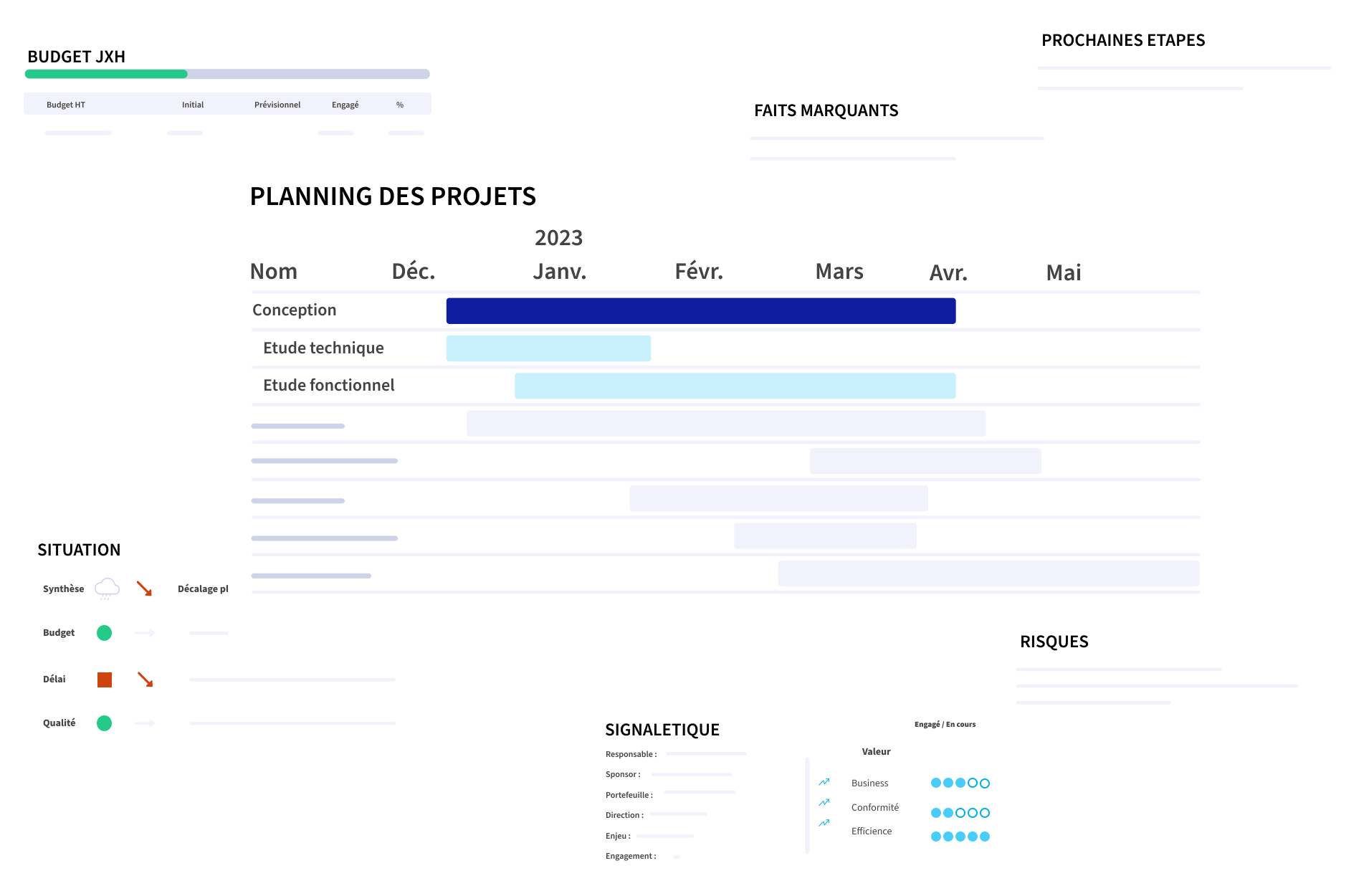
Share effective, relevant reports in 3 clicks
Copil, Coproj, Costrat… Whether it’s a matter of giving Teams a sense of direction or presenting progress to internal customers or principals, the progress of a project or project portfolio must be communicated effectively using relevant reporting tools.
With Abraxio, create and distribute your project reporting
in 3 simple steps:
- Initialize your report: Abraxio aggregates all project data in real time
- Update your weather and comments
- Publish and share with your whole team
A solution that’s truly tailored to CIOs, making it easy to communicate with both project managers and senior leadership without having to create multiple versions of the same material.
Frequently Asked Questions About the PPM
Is it possible to create project templates with Abraxio?
Yes, Abraxio lets you create and save your own project (or activity) templates: either by building on existing Projects or by creating them from scratch.
What sets Abraxio apart from other PPM solutions?
Abraxio stands out from other PPM solutions because it is specifically designed for CIOs. Beyond its ease of use and the flexibility it offers, Abraxio promotes collaborative project management by involving business units from the very beginning of the requirements definition phase, while providing real-time tracking through concise, customizable reports.
Finally, Abraxio stands out in particular for its unique ability to easily reconcile the annual budget with project budgets, enabling CIOs to monitor and adjust the financial impact of projects on the overall budget in real time, thereby providing clear and continuous visibility into allocated resources.
Does the Abraxio solution help align capacity planning with the IT department’s budget management?
Abraxio enables real-time reconciliation of resource tracking with budgetary impacts. By natively aligning projects, teams, and budgets, the solution provides a consolidated view that enables you to accurately steer budget forecasts, identify under- or over-staffed resources, adjust financial commitments, and communicate transparently with stakeholders (Senior Management, Business Units, CFO) regarding needs and priorities.
What is the difference between a capacity plan and capacity planning?
Employee workload planning enables precise steering of projects and activities, from cost estimation through to staffing. For managers, the capacity plan provides complete visibility into their employees’ activities and forecasts. This information enables them to take action, anticipate potential issues, and leverage opportunities for optimization.
Capacity planning is a more strategic process; it provides a high level of control by enabling real-time comparisons between staffing needs (the daily and hourly Budgets for Projects and activities) and the capacity to meet those needs (the number of days worked by employees).

Testimonials
of DSI

Souvent, on reproche à l’IT de « coûter cher », de ne pas sortir grand-chose, ou pas si souvent… Grâce à Abraxio, j’ai été capable de démontrer qu’avec le SI dont j’ai hérité, le simple fait de tourner la clé le 1er janvier va coûter tant, et qu’on n’y échappera pas sans changements de fond…

Abraxio simplifie incroyablement la planification budgétaire. 4 clics suffisent pour préparer un nouvel exercice et reprendre toute la base de budget. (…) Grâce à Abraxio, j’ai raccourci mon processus d’élaboration budgétaire de 3 mois à moins de 2 semaines.

Abraxio me permet de garder les idées au clair !

Vu la facilité de mise en oeuvre d’Abraxio, j’ai du mal à comprendre les DSI qui continuent à gérer leur budget dans Excel !

Une plateforme sans équivalent et sur-mesure pour les DSI, qui libère du temps.

Abraxio est toujours ouvert et à jour en permanence. Il est devenu mon assistant du quotidien, et l’est de plus en plus. Par exemple, je suis allé beaucoup plus vite cette année dans la préparation de mon budget prévisionnel N+1.

Les discussions avec la DAF et le CODIR ont gagné en clarté et fluidité. […] La plateforme permet de gérer les notions de Capex et d’Opex et d’expliquer leur impact d’une année sur l’autre. […] C’est presque devenu un jeu d’enfant de montrer comment l’investissement se transforme en fonctionnement.

Pour un DSI de transition ou en prise de poste, Abraxio a cette vraie force de mettre rapidement en mouvement les équipes SI
Resources
in connection with “Projects